Archive

Archive for the ‘Mac OS X’ Category

SizeUp – Resize/Position Windows Using The Keyboard

March 2nd, 2010

I’ve posted a few scripts I’ve written to solve some window placement issues on OS X (especially when removing an external display). I actually haven’t been using my scripts as much recently since I found this application. Put simply: it allows you to move and position windows using the keyboard. Check out the web site for full details including a video of it in action. At $13 for a license, it’s a no brainer, give it a try: SizeUp

Jonathan Laliberte Mac OS X, Software

iTunes Won’t Play Songs OS X Fix

January 7th, 2010

I was just playing around with the Boxee Beta and it hung. I force quit it, and subsequently tried to play a song in iTunes. It wouldn’t play. I tried playing a new song and took note: the time didn’t move from 0:00, the song information was scrolling at the top, and there was a speaker icon next to the song. Yes, the volume was up. Quitting iTunes and reopening it didn’t fix it (tried a few times).

So, I opened up Activity Monitor and did some quick searches to see if I could find something related to iTunes, Boxee, and Sound. Anyway, there is a process called coreaudiod – the core audio daemon. Force-quit that (requires admin privileges) and boom! iTunes works again.

Jonathan Laliberte Mac OS X, Software

Restore Previous Display Window Positions AppleScript

February 4th, 2009

This AppleScript is sort of a hack to restore window positions after removing/adding an external display, similar my other script to move all windows to the main screen. You should run it before you disconnect the display, then again when you reconnect it. It’s customized for my environment right now, so you’ll need to look through the code a bit to customize it. I have this saved as an application in my Applications folder for quick launching with Spotlight.

property numFFWindows : 0
property FFPos : {}
property FFSize : {}
property iTunesPos : {}
property iTunesSize : {}
property iCalPos : 0
property iCalSize : 0
property AdiumContactsPos : 0
property AdiumContactsSize : 0
property AdiumIMSize : 0
property AdiumIMPos : 0
property OFPos : 0
property OFSize : 0

display dialog "Set Window Position or Save Window Position?" buttons {"Restore", "Save"} default button "Restore"
set theResult to result

tell application "System Events"
    if (button returned of theResult is "Restore") then
        -- Restore Settings
        if (numFFWindows > 0) then
            tell process "Firefox"
                repeat with i from 1 to numFFWindows
                    set position of window i to (item i of FFPos)
                    set size of window i to (item i of FFSize)
                end repeat
            end tell
        end if
        if (iTunesPos is not {0, 0}) then
            tell process "iTunes"
                set position of window 1 to iTunesPos
                set size of window 1 to iTunesSize
            end tell
        end if
        if (iCalPos is not {0, 0}) then
            tell process "iCal"
                set position of window 1 to iCalPos
                set size of window 1 to iCalSize
            end tell
        end if
        if (OFPos is not {0, 0}) then
            tell process "OmniFocus"
                set position of window 1 to OFPos
                set size of window 1 to OFSize
            end tell
        end if
        if (AdiumContactsPos is not {0, 0}) then
            tell process "Adium"
                set position of window "Contacts" to AdiumContactsPos
                set size of window "Contacts" to AdiumContactsSize
                repeat with i from 1 to (count windows)
                    if ((window i) is not (window "Contacts")) then
                        set position of window i to AdiumIMPos
                        set size of window i to AdiumIMSize
                    end if
                end repeat

            end tell
        end if

    else
        -- Save Settings
        tell process "Firefox"
            set numFFWindows to count windows
            set FFPos to {}
            set FFSize to {}
            repeat with i from 1 to numFFWindows
                set end of FFPos to (position of window i)
                set end of FFSize to (size of window i)
            end repeat
        end tell
        tell process "iTunes"
            set iTunesPos to position of window 1
            set iTunesSize to size of window 1
        end tell
        tell process "iCal"
            set iCalPos to position of window 1
            set iCalSize to size of window 1
        end tell
        tell process "OmniFocus"
            set OFPos to position of window 1
            set OFSize to size of window 1
        end tell
        tell process "Adium"
            set AdiumContactsPos to position of window "Contacts"
            set AdiumContactsSize to size of window "Contacts"
            set AdiumIMPos to {}
            set AdiumIMSize to {}
            repeat with i from 1 to (count windows)
                if ((window i) is not (window "Contacts")) then
                    set AdiumIMPos to (position of window i)
                    set AdiumIMSize to (size of window i)
                end if
            end repeat
        end tell
    end if
end tell

Jonathan Laliberte Apple, Hacks, Mac OS X, Scripts

College Ramblings…

December 31st, 2008
My Bachelors Degree in Computer Science

My Bachelors Degree in Computer Science

(I have a bunch of posts I have started but not finished. So I’m going to start posting them. Some of them may not best, but I’d like to get them cleared out. Here’s my oldest post – draft dated 10/16/2007, finishing it up today.)
Please Note: This is a rambling.

So I have my Bachelors degree in Computer Science. This is great, but my thoughts about it really boil down to this: big deal. I have learned a decent amount throughout college in regard to my major, no doubt about it. But I believe I have missed many more opportunities in the process such as:

  • (Indie) Software development
  • Other Business – this is sort of a big list

I really have not progressed in my knowledge of OS X specific development, even though I finished my BS 1.5 years ago. I can blame many, many things for this, and a post about this is coming up soon. The biggest loss here I think is lost experience-time on the platform. If I am not able to make it on my own with OS X software development, I’d at least like to work for a Mac software company. I have done some development on Windows, but at school and at EMC I work exclusively on Linux. In terms of business development, I’ve made only moderate gains where I believe larger gains should be possible, as well as let a few entire business ideas not see the light of day because “I don’t have time”.

My biggest gains from going to college:

  • Friends/Contacts
  • Ideas
  • Some maturation(I’ve been told this is disputable though)
  • It was fun… Lots of fun
  • I learned a few things too
  • I don’t plan to expand on this too much. I am happy I went to college, and to have earned my degree. That being said, I just sometimes wish I had been able to spend my time on other things. I believe many of the required courses outside of my major were a HUGE waste of my time. You can give me the “it makes you a well rounded person” BS all you want, but I believe a dedicated course on “Software Engineering” or “Debugging and Performance Optimization”, beats out “Philosophy in Film” in terms of usefulness by a nearly infinite amount. Or how about a course I would have loved: “Mac OS X Software Development” – I tried to do this as a directed study for a project sequence in late 2007, alas the proposal fell on deaf ears and I instead went with “Internet and Web Systems” (read: HTML, CSS, and JavaScript, you know things I had been doing since I was 13).

    Yada, Yada, Yada

    The experiences and friends gained throughout my college years are priceless to me (Should I count the student loans?) – and having the degree looks good on the resume if I need it. I hope I don’t though, I don’t believe that I am meant to be a 40+hr/week worker. I love running my own business(es) and hope to continue to do so. I look forward to sharing my escapades in starting a few new ones with everyone this year. Here’s to 2009.

Jonathan Laliberte Education, Life, Mac OS X, Personal, Rambling

OS X Memory Issues

October 13th, 2008

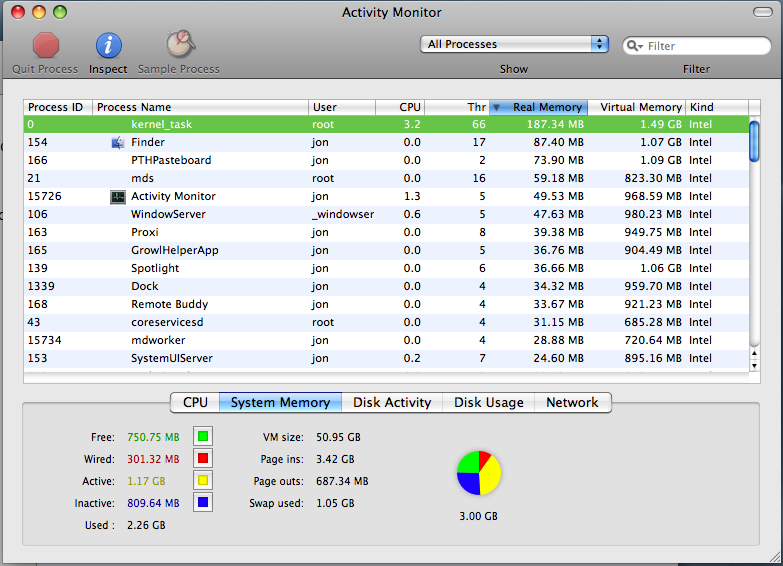
With Activity Monitor and the Finder open, and, a few background apps (Remote Buddy, Proxi, and PTHPasteboard). I had just closed all other apps: Mail, FireFox, iTunes, PandoraBoy, Adium, iCal, probably a few others.

With 3GB Physical RAM in this system, I was left with 750MB free:
memoryleaks.png

This, is no good.

Update (12/29/09): I finally googled this, no idea why I waited so long. Anyway, Mac OS X: Reading system memory usage in Activity Monitor.

Jonathan Laliberte Bugs, Mac OS X

Make Everyday The Middle Of The Week in iCal

September 8th, 2008

I prefer using iCal in “Weekly” view mode. My problem with this mode though is that once you get towards the end of the week, you will not see what is coming up the next day(s) without explicitly switching to the next week – surely we can fix this?

What I wanted was to be able to see today, maybe the day before, and the next 5 days. After all, the past 6 days is seldom useful, but it’s nice to know what is happening the next 3-5 days.

This script will do this for you. It does so by changing the “Start Week On” preference in iCal everyday at midnight.

To reiterate, my preferred setting is to have the SECOND day of the week be TODAY. If you’d prefer another day, change the number 5 in the script below(4 = 1st day, 5 = 2nd day, etc).

The Applescript to perform this is:

-- Quit iCal if it is open
tell application "System Events" to set isiCalOpen to count ¬
	(every process whose creator type is "wrbt")
if (isiCalOpen is 1) then tell application "iCal" to quit

-- Make the change
do shell script ¬
	"defaults write com.apple.ical \"first day of week\" -int " & ((((weekday of (current date)) as integer) + 5) mod 7)
delay 2
-- Open iCal
tell application "iCal" to activate

Open in Script Editor

If you’d like to have this script run everyday, you may want to check out the excellent Launchd editor, Lingon. My LaunchAgent file can be downloaded here: iCal LaunchAgent.

Jonathan Laliberte Mac OS X, Scripts, iCal

‘batch’ broken in Mac OS 10.5 (Leopard) – SOLVED

May 14th, 2008

Give it a try and let me know if you agree… Quick test:
$ batch now
> ls
[control-d]
job 1 at Wed May 14 14:02:27 2008

$ atq
778240 Fri Jan 18 09:03:00 2002

———-

$ batch 17:00
> ls
[control-d]
job 5 at Wed May 14 17:00:00 2008
$ atq
778240 Sat Jul 17 12:39:44 1993

Update: 10.5.3
This doesn’t seem to happen anymore in 10.5.3, but it doesn’t quite seem to work either:

$ at 3:00
> touch /TEST.TEST
job 10 at Sun Jun 1 03:00:00 2008

This was ran at 2:59:30(or so) and as of 3:45:
$ atq
10 Sun Jun 1 03:00:00 2008

Yet, the command did not execute.

Update 9/21/09:

I don’t know how I missed this before, but in the man page for at on OS X, there is the following comment:

Note that at is implemented through the launchd(8) daemon periodically
invoking atrun(8), which is disabled by default.  See atrun(8)
for information about enabling atrun.

Going over to the atrun page shows that you can enable a launch daemon to periodically run queued at and batch jobs. The executiable that does this should be run with root permissions and is located at /usr/libexec/atrun

Jonathan Laliberte Apple, Bugs, Mac OS X